
Viral Anime FlashLight Al Photo Editing Prompt, As you know, I share various prompts along with editing steps, tips, and tricks on my website—content that you can easily use and apply to your own photos. You will find prompts and tips for the kind of photo and video content that is currently trending on social media platforms like Instagram and Facebook, helping people go viral. You can apply these techniques to any photo—whether taken with a professional camera or a smartphone—and you will find a wide variety of such prompts available here.
In today’s article, I am sharing a fantastic and unique AI photo editing prompt—specifically designed for a stylish look—that leverages the power of AI to create the exact image you envision. By applying this prompt to any of your photos, you can generate a stunning cinematic image featuring a small “Shin-chan” cartoon character (resembling a tattoo) positioned behind you, all set against a magnificent cinematic background bathed in golden-hour lighting. I will walk you through all the necessary steps and details to ensure a smooth and hassle-free experience.
About the Viral Anime Flashlight AI Photo Editing Prompt:
We have provided a single AI prompt here that allows you to create unlimited photos. With this prompt, your resulting image will look 100% realistic—exactly like the sample you saw—and your facial features will match perfectly. The image features a small, cartoon-style boy standing behind you, holding a flashlight that shines a beam on your back; additionally, there is cinematic lighting tracing the contours of your body, creating a striking effect. AI technology has advanced significantly, and it is poised to handle most tasks in the future. Since the advent of AI, people have started keeping tools like ChatGPT on their phones, enabling them to easily find information or ask questions about their photos or any other topic.
Viral Anime FlashLight Al Photo Editing Prompt
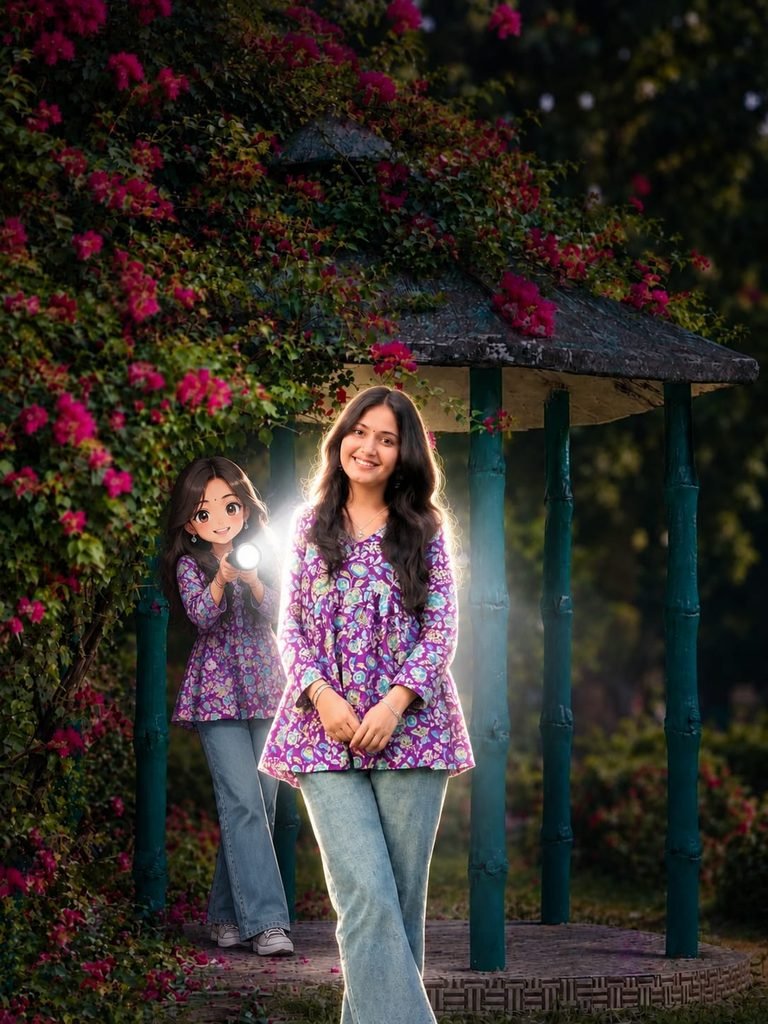
Transform the main subject into a small full-body anime/cartoon version of themselves, matching their hairstyle, outfit, accessories, colors, and recognizable details. Use the reference's clean modern anime aesthetic sharp linework slightly oversized head, compact proportions, cel shading, and expressive details. Position the anime character directly behind the real subject, holding a flashlight aimed forward at their back. Create an intense realistic white beam that fully illuminates the subject from behind, producing bright rim light, glow, and natural shadows. Dim the surrounding outdoor light for dramatic contrast. Preserve the original scene, camera angle, composition, and realism. Don't change face
How to Use the Viral Anime Flashlight AI Photo Editing Prompt
To create the “Anime Flashlight” style photo, you will need the ChatGPT app; you can download it using the link provided below. Once downloaded, log in using any Gmail account. Next, locate the “+” icon at the bottom of the screen, click on it, and upload the photo you wish to transform. Then, copy the prompt corresponding to the style you like, paste it alongside your photo, and hit send. After waiting a brief moment, your photo will be ready; simply click the download option provided below to save it.
Conclusion Of Viral Anime FlashLight
As you know, the AI prompts I share are always unique and distinctive. This particular prompt—for the viral “Anime Flashlight” AI photo editing style—is fantastic. I have provided all the necessary details; all you need to do is follow the steps to create your photo. If you encounter any issues while creating it, please let me know in the comments. You can also comment if you are looking for any other types of AI prompts.